
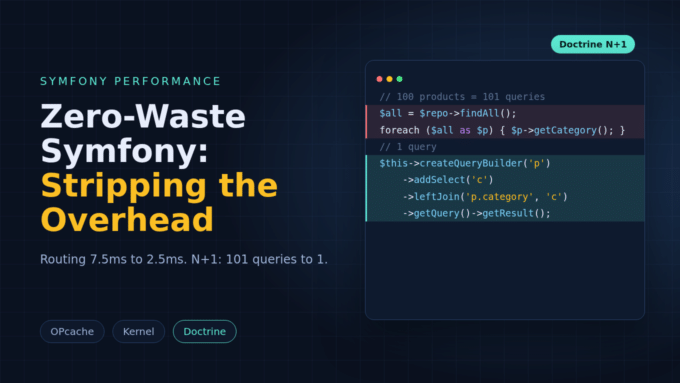
Zero-Waste Symfony: Stripping the Overhead

I rarely find one bug behind a slow Symfony app. I think of it as a stack, and I know every layer can waste time.
E-commerce platforms see conversion drop by 7% for every 100ms of latency. For an API, 50ms versus 200ms of overhead can decide whether the bill stays sane or spirals out of control. I’d say a slow app feels as bad as a broken one. I don’t believe in a magic switch. I check four places in turn: the PHP runtime, the kernel, the data layer and the background queue.
The Foundation of the Modern PHP Runtime
I’d start with the cheapest speed-up, a newer PHP. In the benchmarks I know, Symfony requests average 5.7ms on PHP 8.3 and 7.2ms on PHP 7.4. PHP 8.4 adds native lazy objects and better JIT support. For some CPU-bound work I’d expect a gain of up to 70%.
| Runtime Configuration | Performance Gain (Symfony) | Performance Gain (PHP) | Key Benefits |
|---|---|---|---|
| PHP 7.4 to PHP 8.3 | 20-35% | 15-20% | Major engine refactoring and JIT introduction. |
| PHP 8.3 to PHP 8.4 | 7-70% | 5-10% | Native Lazy Objects and better JIT support. |
| PHP 8.4 to PHP 8.5 | 3-5% | 3-5% | Refined URI parsing and object cloning. |
I think most of the 8.4 gain comes from cheaper object creation. Symfony 8 uses these features directly, such as the HTML5 parser and lazy objects. PHP added them for frameworks like it. I wouldn’t ignore the 3-5% step from 8.4 to 8.5. On a busy SaaS platform it turns into hosting cost, and I think it adds up.
OPcache Strategy for Production Stability
In my view OPcache matters more than any other single setting. With it, PHP stops loading, parsing and compiling files on each request, and I count on that. The defaults rarely suit production. So I change these five before I do any deeper tuning, because they cost nothing and fix the most:
| Setting | Value | Rationale |
|---|---|---|
opcache.memory_consumption | 256 | Accommodates large codebases including vendor dependencies. |
opcache.max_accelerated_files | 32531 | Ensures all project files are stored in the cache. |
opcache.validate_timestamps | 0 | Prevents the engine from checking file changes on every request. |
opcache.interned_strings_buffer | 20 | Stores immutable strings (class names, keys) in shared memory. |
opcache.jit_buffer_size | 64M | Provides sufficient space for the JIT compiler’s machine code. |
I treat validate_timestamps=0 as a hard rule for production. So PHP assumes the filesystem never changes, and I accept that. We pay for it at deploy time, because every release has to clear the cache: we restart the web server, call opcache_reset() from a script, or run cachetool. Any of them works for me. That’s the price. I’d pick the one our pipeline can script without a human step.
The Evolution of OPcache Preloading
Preloading came in PHP 7.4. It got refinements in 8.4. At startup PHP compiles a list of files for us and serves them to every request like built-in functions. I’d try it on a high-throughput app, since response time can drop by 10% or more when the autoloader work disappears.
In a typical Symfony app, autoloading takes 10ms to 16ms, and if your API answers in under 100ms, that’s a big slice of the time, so I’d try preloading there. That’s a lot. Symfony writes a preload.php file while it compiles the container, so I find the setup cheap. My reservation is the larger memory footprint and the slower start of each PHP-FPM process. Not free.
If the app already needs 500ms or more per request, saving 10ms is noise to me. I’d go after the database or I/O first, probably. I know that’s less fun than a clever preload trick.
Architectural Efficiency in the Framework Kernel
Symfony’s kernel is flexible, and flexibility has a baseline cost. I want routing, service creation and translation to take as little of each request as I can get.
Service Container Optimization
By default Symfony compiles the container into many small files, which is nicer for developers. In production I’d dump it into one file, and I wouldn’t think twice. I expect a faster kernel boot from fewer includes, especially together with preloading.
The trap I’d watch first is the heavy constructor. Symfony builds event listeners and their dependencies while the request boots. So any logic in a constructor runs, even when nobody uses that service. I call that waste. I’d be careful when a service pulls in the Doctrine registry or a template engine. Each one drags in more services, and we pay for all of them.
| Instantiation Trap | Impact | Resolution |
|---|---|---|
| Heavy work in constructor | High latency on every request | Use native PHP 8.4 lazy objects or lazy ghost services. |
| Injecting Twig into listeners | Unnecessary overhead for JSON APIs | Use the container for lazy retrieval or refactor the listener. |
| Deep dependency layers | Slow kernel bootstrap | Use service autowiring and private services to simplify the graph. |
PHP 8.4 lets Symfony create ghost objects that initialize in place, only when a property is read. I prefer them to the older proxies. A proxy and the real instance are two different objects. A ghost avoids that identity problem, and that is why I trust ghosts more than proxies, even though the older approach still works.
Routing
In my view routing is the first real hurdle for a request. With hundreds of routes the matching cost climbs, so Symfony uses bit masks and static prefix grouping.
I group routes by common prefix and push dynamic segments like {id} to the right end of the URI. I trust a plain string comparison over a regular expression, because it is faster by orders of magnitude. If a dynamic route has only a handful of variants, I’d write them out as static routes, and I’d expect to save several milliseconds. One documented case cut routing from 7.5ms to 2.5ms by optimizing the generated routing code and the HTTP method matching. I’d measure my own routes before copying that.
Realpath cache
Symfony is heavy on files, and one request can check hundreds of PHP files, YAML configs and translation fragments before it sends a single byte. I like that PHP keeps the resolved paths in the realpath cache, so it skips repeated disk work.
| Cache Parameter | Recommended Value | Context |
|---|---|---|
realpath_cache_size | 4096K | Accommodates the high volume of file paths in Symfony. |
realpath_cache_ttl | 600 | Caches paths for 10 minutes, assuming code is immutable. |
One catch that I’d flag: PHP turns the realpath cache off when open_basedir is set. On shared hosting we feel that a lot.
The Data Layer: Doctrine ORM and Database Discipline
Around 80% of performance problems live in the database. I like Doctrine, but I think it needs a database-first mindset. Without one we get the N+1 problem or a memory spike.
N+1 queries
The app loads a collection and then, in a loop, loads a related entity for each item. For me this is the classic N+1. With a hundred products I get 101 queries instead of one.
My fix is a leftJoin with an addSelect in the QueryBuilder. Doctrine then fetches everything in one SQL query and fills the related objects at the same time.
// Eager Loading in ProductRepository
public function findAllWithCategories(): array
{
    return $this->createQueryBuilder('p')
        ->addSelect('c')
        ->leftJoin('p.category', 'c')
        ->getQuery()
        ->getResult(); // Executes exactly 1 query
}I should add that eager loading has a cost too. If a request rarely needs the related data, lazy loading keeps memory lower, so I wouldn’t join everything by default.
Bidirectional One-to-One Relations and Ownership
My pick for the silent killer is the bidirectional One-to-One relation. The owning side holds the foreign key. I find the inverse side trickier. When Doctrine loads it, the table has no key to check, so Doctrine runs an extra query to find the related record.
One real debugging case: an application produced 40,000 extra queries per day. The owning side sat on the entity that was fetched less often than its counterpart. Flipping the owning side to the entity queried more often removed those queries at once. Quick win. I’d check every one-to-one relation in an app for this, because the cost hides in the logs and nobody sees it. Easy to miss.
Hydration
Turning rows into PHP objects is one of the most expensive things Doctrine does. I don’t see why a read-only dashboard should build thousands of entities.
| Fetch Mode | Execution Time | Memory Usage | Use Case |
|---|---|---|---|
| DQL (Full Hydration) | 4,500ms | 128MB | Complex domain logic, write operations. |
| DQL (Partial Objects) | 3,800ms | 110MB | Limited field access, still object-based. |
| Native SQL (Array) | 450ms | 12MB | Dashboards, high-throughput lists, exports. |
For read-heavy paths I’d skip the ORM and fetch plain arrays through DBAL. In my opinion it scales better than the alternatives.
Scalability and Asynchronous Task Management
I don’t want a user waiting for an email to go out or a video to process before the page reloads. Symfony Messenger lets me move that work out of the request and into workers.
Payload size
I see fat payloads as a common problem in high-throughput queues. Big JSON strings in Redis or Amazon SQS eat RAM and add network time. I’d measure that early.
Since Symfony 7.4 and 8.0 the CompressStamp compresses the payload natively. In one benchmark, 4.88GB of raw payloads in Redis shrank to 410MB, and I’d call that a big win. Compression costs CPU and raises worker load, which I’d watch on the dashboards. Still, the bottleneck moves from network to processor, and total dispatch got 17% faster. I find that trade acceptable, but I’m not sure it holds for every workload.
| Message State | Storage Size | CPU Impact | Processing Time |
|---|---|---|---|
| Raw Payload | 4.88GB | Low | 42s (Network bottleneck). |
| Compressed | 410MB | Moderate | 35s (Faster dispatch). |
| Compressed + Encrypted | 550MB | High (38%) | 48s (CPU bottleneck). |
Resiliency and Silent Failures in Workers
The nastiest Messenger bug, in my opinion, is the silent one. A worker starts fine and consumes nothing, and that makes it easy to miss. I’d check the DSN first. Often it has auto_setup=0 and nobody created the tables by hand.
Timezones cause a second version. Same symptom. If the PHP CLI and the MySQL server disagree, the worker sees some messages as scheduled in the future, so they just sit there. I’d standardize on UTC in FPM, CLI and the database. We get fewer surprises that way, and I can’t think of a good reason to skip it.
Leveraging Modern Symfony 8 Components
Symfony 8 brings two components I like. Both aim at lower memory use. I’d look at both.
High-Performance JSON with JsonStreamer
A classic JSON encoder loads the whole object graph into memory first and then builds the string, and I don’t like that on big exports, because memory use grows with every row we add. That hurts. JsonStreamer, added in Symfony 7.3 and central in 8, streams instead. In my reading of the numbers, it serializes 10x faster and uses 50% less memory on large data.
I think it fits DTO-based designs with public properties. With the #[JsonStreamable] attribute, the encoding logic is generated at cache warm-up, which saves a few more milliseconds per API response.
| JSON Strategy | Advantage | Disadvantage |
|---|---|---|
| Stream Decoding | Minimal memory usage, handles infinite files. | Slightly slower due to incremental parsing. |
| String Decoding | Maximum speed for small payloads. | High memory usage for large files. |
ObjectMapper and Data Transfer Objects
ObjectMapper moves data between entities and DTOs. People used PropertyAccess or manual mapping for that before. It’s 50% faster than the old methods, and I credit the TypeInfo component and the tuned internal loops for that. When needed, it can read raw data and skip lazy ghost objects.
Profiling and the Measurement Workflow
Without a baseline, I can’t tell an optimization from a config change with unknown effect, so before I touch anything I measure the current state and write the numbers down. It’s boring work. I start with micro-benchmarks for pure PHP logic and end-to-end HTTP runs with wrk or k6. Then I set an SLO, for example p95 under 150ms on a search endpoint, so our team knows when it’s done.
I like the Symfony Profiler in development. It adds its own overhead, so I wouldn’t use it to judge absolute production speed. For that, I reach for these:
- Blackfire is my first choice for Symfony, so I’ll start there. Its call graph shows me which services burn the most CPU or memory, and that saves guessing.
- Symfony Stopwatch is a light way for me to time one block of code by hand.
- Tideways helps me find slow event listeners and container lazy-loading problems.
The Five Whys of Performance Degradation
Say response time climbs from 120ms to 750ms. I’d use the Five Whys technique to find the cause. I’d keep asking until the answer is a config line or a line of code, and then I’d stop.
- The server is crashing, because CPU usage is high.
- CPU is high, because each request does heavy work.
- The work is heavy, because routing became expensive.
- Routing is expensive, because it loads the whole route collection instead of the tuned cache.
- The collection gets loaded, because a wrong config triggers the
YamlFileLoaderin production.
Engineering Management and CTO Strategy
As I see it, performance is an investment for a tech leader. I think hosting choices set the ceiling for how far the organization can scale. I’d rather decide that early than find out during a traffic spike, when the fix costs more and everyone is watching.
FrankenPHP and RoadRunner offer a daemon-style alternative to PHP-FPM. They keep the app in memory between requests, so we skip the framework boot cost entirely. I find that attractive.
| Runtime Model | RPS | Relative Gain |
|---|---|---|
| PHP 7.2 | 845 | Baseline. |
| PHP 7.4 + OPcache | 931 | +10%. |
| PHP 7.4 + Preload | 1030 | +21%. |
| RoadRunner (Optimized) | 1089 | +28%. |
My rule for PHP-FPM versus a worker model is simple, and I look at the bootstrap first. If container compilation and service creation take a big share of each request, I’d expect worker mode to pay back the most.
Audit checklist
I’d run the same checklist on every project, regularly, because performance slips quietly. I’d ask our team these questions:
- Environment: is
APP_DEBUGstrictly false in production? Is the autoloader tuned withcomposer install --optimize-autoloader --no-dev? - Doctrine: do we watch the slow query log? Do the busiest routes have N+1 queries?
- Caching: do we use HTTP caching (Varnish or Symfony’s reverse proxy) for public content? Is expensive data in APCu or Redis?
- Assets: are CSS and JS minified and served from a CDN?
- Async capacity: are enough consumers running for the volume in our queues?
Conclusion
Symfony hands us the tools: OPcache preloading, lazy objects, JsonStreamer and Messenger. Our team supplies the discipline, and that is the part I can’t automate. My own order is PHP 8.4 first, then database habits, then the stream-based components, with profiling at every step. Performance never ends. I’d rather treat it as a habit.